
Citation Search
Both forward and backward citations can be searched in Quartet.
- A forward citation search retrieves records that are citing the patent(s) of interest.
- A backward citation search retrieves previously published records that are cited by the patent(s) of interest.
Citations can be searched on DOCDB family level by using the CIT command, and on domestic family level by using the PUBCIT command.
The above commands will search both forward and backward citations.
Modifiers can be included to search only forward or only backward citations. Additionally, modifiers can be included to search only citations from the specified category.
Citation commands
| Command | Details | Examples |
| CIT | Forward and backward citation search for DOCDB families on a search query or line number. | CIT(5) forward & backward citation search of the results in line 5 CIT(PNUM=US10000000) forward & backward citation search of US,10,000,000 |
| CITF | Forward citation search for DOCDB families on a search query or line number. | CITF(5) forward citation search of the results in line 5 CITF(PA=(Netflix)) forward citations search of patents where Netflix is the assignee CITF.X(PA=(Netflix)) same as above, however only citations categorized as X or 102 |
| CITB | Backward citations search for DOCDB families on a search query or line number. | CITB(4) backward citation search of the results in line 4 CITB(IN=("Deng Han")) backward citations of patents where John Smith is the inventor. |
| PUBCIT | Forward and backward citation search for domestic families on a search query or line number. | CIT(5) forward & backward citation search of the results in line 5 CIT(PNUM=US10000000) forward & backward citation search of US,10,000,000 |
| PUBCITF | Forward citation search for domestic families on a search query or line number. | PUBCITF(5) forward citation search of the results in line 5 PUBCITF(PA=(Netflix)) forward citations search of patents where Netflix is the assignee PUBCITF.X(PA=(Netflix)) same as above, however only citations categorized as X or 102 |
| PUBCITB | Backward citation search for domestic families on a search query or line number. | PUBCITB(4) backward citation search of the results in line 4 PUBCITB(IN=("Deng Han")) backward citations of patents where John Smith is the inventor. |
Citation Field Modifiers
| .A | Returns only citations classified as A (technological background) | CIT.A(5) |
| .X | Returns only citations classified as X or 102 (Relevant on it's own or lack of novelty) | CIT.X(PNUM=US10000000) |
| .Y | Returns only citations classified as Y or 103 ( Relevant in combination with others, or as a combination reference) | PUBCITF.Y(PA=(Netflix)) |
Running a Citation Search from a record
Citation searches can also be run from the detailed view of a record. From the detailed view, choose the Citations tab in the middle pane. This view shows citations from each document in the family, as well as a filter option for each type of citation, or country code. From here there is a "Run citations search" button.
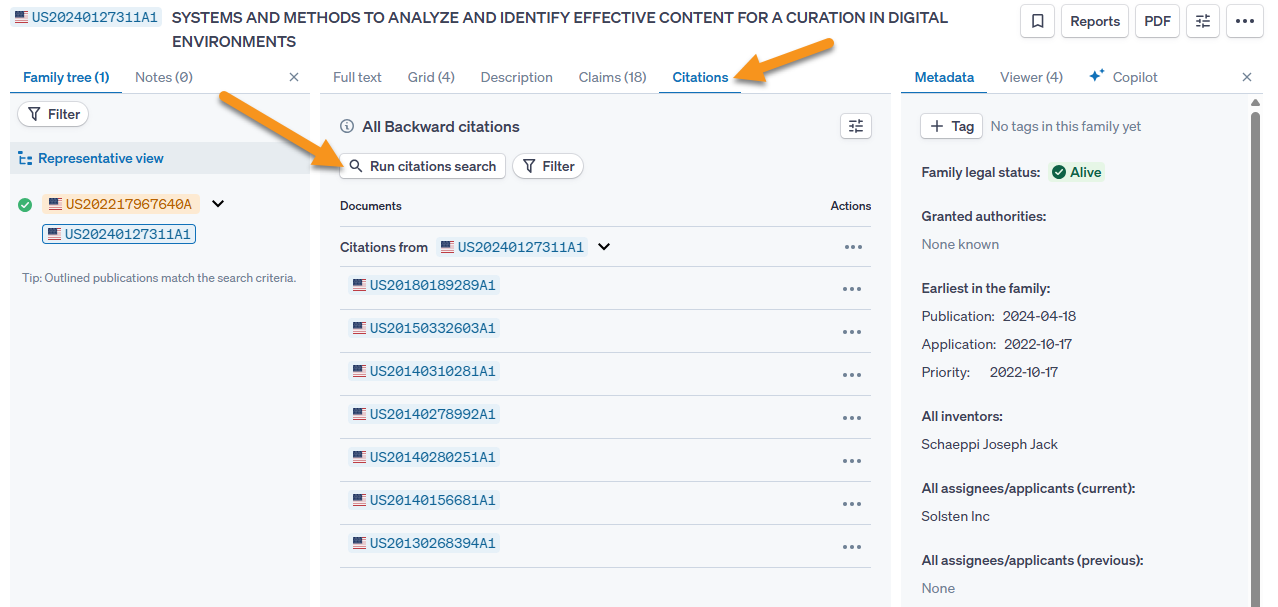
The button will bring up a dialog box for choosing specifics for the citation search
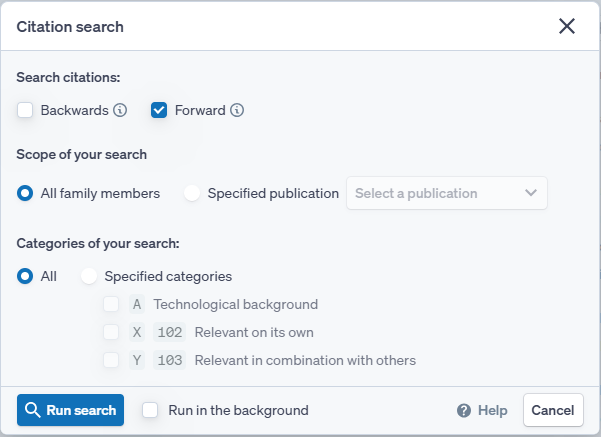
From here, citation forwards or backwards or both can be chosen, as well as which family members are searched, and the type of citation, A, X, or Y. Additionally the search can be run in the background as with all other modals.