
Detail View Actions
Near the upper right corner of Detail View are various available actions for an individual family or family member.
- The flag icon
 will save the patent family to the Saved list.
 - The "Reports" button will save the representative family member or the selected publication to a selected report.
- The "PDF" button in the upper right will open the original PDF of the representative family member or the selected publication in a new tab in the browser.
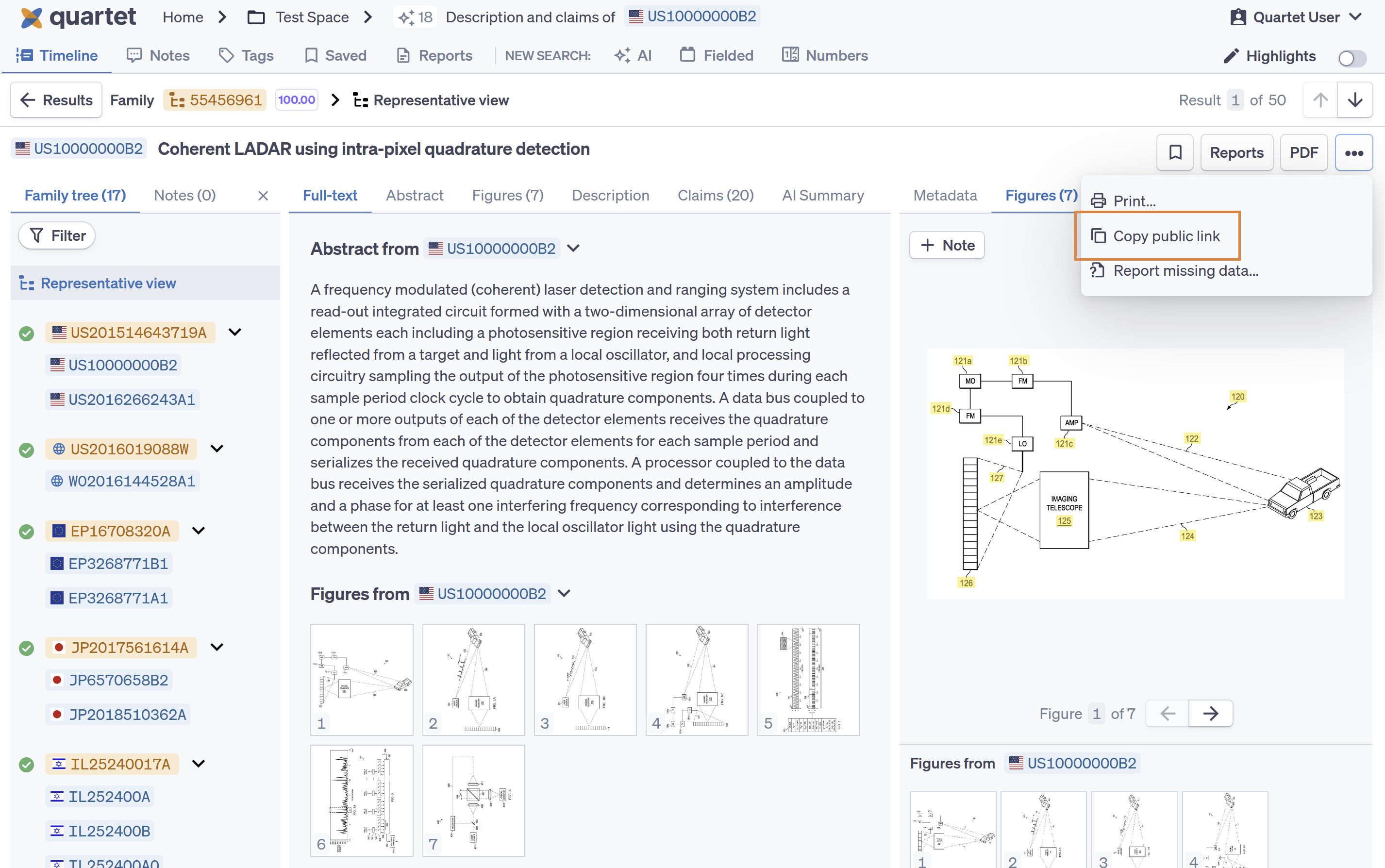
- A three-dot actions button provides further options to print the representative family member or the selected publication or generate and copy a public link to the individual family or publication for external sharing.
Three-dot actions button
Printing a document
The contents of a document can be printed from Quartet. This can be helpful for generating a copy of the machine translation of a foreign document.
When in Representative view, Quartet will print from the selected representative member for each section. When in the detailed view and viewing a specific publication, that publication will be printed rather than the representative view.
Also note that the system currently only prints available text and will not print figures.
Public Link
Public links of individual families or publications my be shared from the three-dot “actions” button near the title of the document. The public link allows for the sharing individual documents externally to anyone with the URL even if the external user does not have Quartet access.
The public link will lead to a slightly stripped-down version of the Detail view of the shared document. This view will only show the shared document and will not have access to other parts of the project; for instance, highlights will also not be seen when a document is accessed via a public link.